
어린이집 증명사진 셀프 변환
추천 AI
우리 아기 맞춤 만들기
프롬프트가 자동 입력됩니다. 본인 아기 사진을 첨부해서 전송하세요.
프롬프트
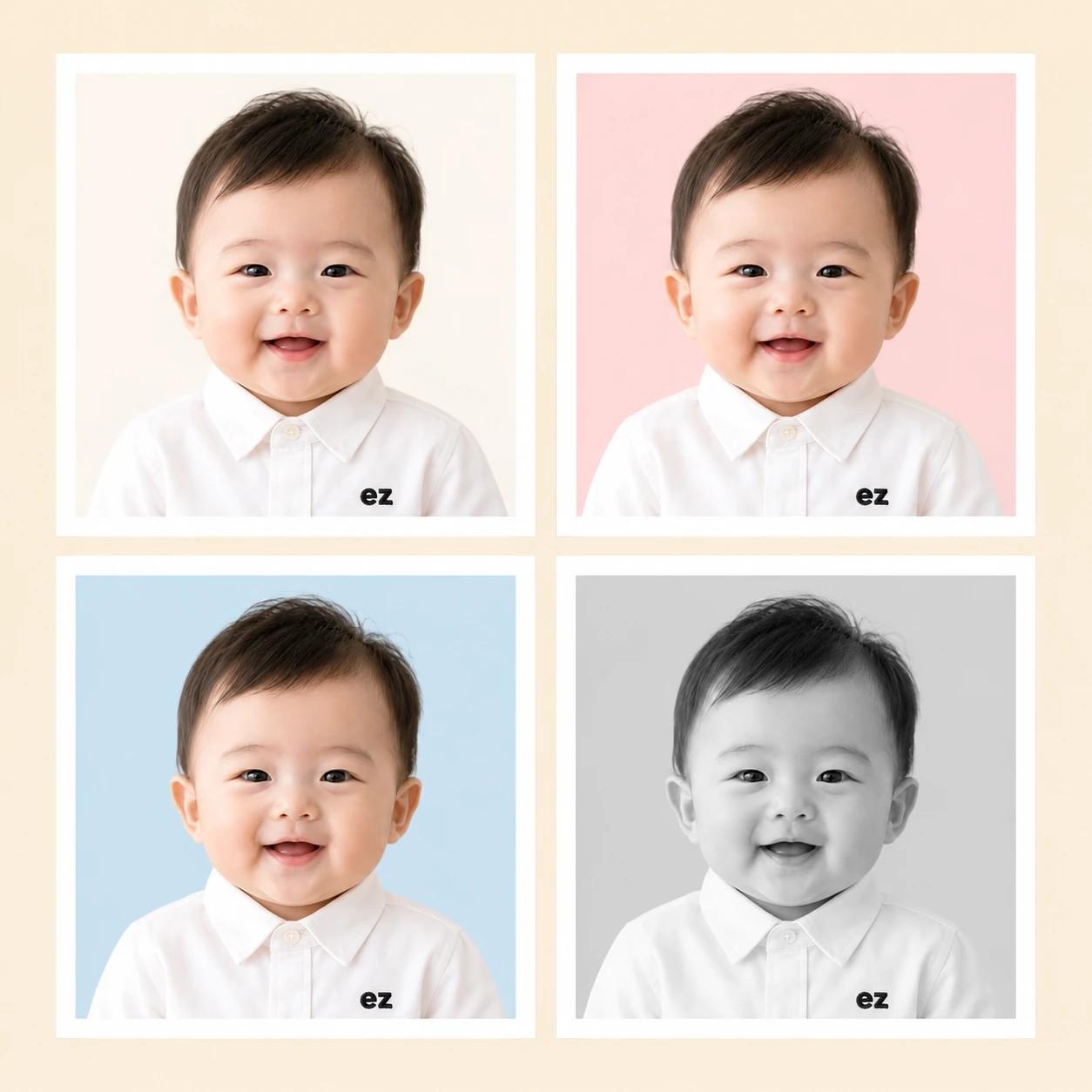
[Purpose] Convert the user's attached baby/child photo into a clean Korean daycare ID portrait (어린이집 증명사진) in the Ezdodal photo-paper style. [Scene] Use the attached photo as the base. Preserve the original child's face, expression, eyes, eye color, hairstyle, hair color, skin tone, and natural facial proportions exactly (identity intact). Recompose as a head-and-shoulders ID portrait: child facing the camera directly, shoulders squared and level, both ears visible. Expression: {smile_detail}. Outfit: a crisp white oxford dress shirt with a clean pointed collar and one visible small white button at the placket, neatly pressed. On the upper-left chest of the shirt, embroider a small lowercase 'ez' brand monogram (bold geometric sans-serif similar to Futura Bold / Avenir Next Heavy, tight letter spacing, deep charcoal #2a2a2a thread, about 3% of image area, embroidered directly on the fabric — NO box, NO border, NO badge frame, just the two letters like a varsity chest mark). Background: {background_description}, perfectly even with no patterns or fabric texture, only a barely perceptible soft vignette at the four corners. Studio lighting: soft frontal key light with mild fill, gentle catchlights in the eyes, no harsh shadows on the face or backdrop. Frame: add a clean pure white (#FFFFFF) photo-paper border evenly on all four sides, about 4% of the image width thick, like a printed instant-photo border. The white border is part of the final image — the portrait sits inside the border. [Style] {style_modifier}. Professional Korean kindergarten/daycare ID portrait photography (어린이집 증명사진), studio quality, sharp focus on the eyes, shallow depth of field. Skin natural and lovely with very light retouching only — keep real skin texture, baby cheeks, and natural pores. No filters, no HDR, no beauty smoothing. [Text] The ONLY text in the image is the small embroidered lowercase 'ez' monogram on the chest. No captions, no watermarks elsewhere, no other logos. [Aspect] 2:3 portrait (1024×1536) — matches Korean ID-photo orientation (3.5×4.5cm style). The portrait fills the inner photo area generously — the child's head occupies about 65-72% of the inner photo height (excluding the white border), with only a small breathing room above the hair (around 6-8% of inner height), and the shoulders fill the bottom edge corner-to-corner. The face should feel large and present, like a proper Korean kindergarten/daycare ID photo where the child reads clearly even at small print sizes. [🚫 IMPORTANT] - Preserve the original child's face, expression, eyes, hair, and skin tone from the attached photo - Do NOT generate a new person, do NOT change age, gender, or ethnicity - The 'ez' monogram MUST be just two embroidered letters on the fabric — NO box, NO border, NO badge frame, NO patch around the letters - The white photo-paper border MUST be evenly thick on all four sides and a clean pure white - Background must be a perfectly even single tone — no patterns, no gradient bands, no dust, no fabric texture - No hats, glasses, or accessories on the child (unless visible in source) - Natural face and ears, no anatomical distortion, no plastic skin - Keep realistic baby/child skin texture — avoid excessive smoothing or saturation
자주 묻는 질문
- Q. 정해진 어린이집 사진관 규격(여권·등본 규격)과 똑같이 나오나요?
- A. 비율은 한국 표준 증명사진(3.5×4.5cm)에 가깝게 헤드샷으로 잡지만, 공식 여권/주민등록 규격은 아닙니다. 어린이집 알림장·홈페이지 프로필·할머니 보내드리는 인사 사진처럼 일상용 증명사진 톤으로 쓰기 좋아요.
- Q. 디자인 안 5개 차이는 뭔가요?
- A. 옷(흰 와이셔츠 + ez 모노그램)과 흰 테두리는 5안 모두 동일하고, 배경 색만 바뀝니다. 크림 화이트는 가장 보편적이고 무난한 톤, 블러쉬 핑크와 웜 베이지는 따뜻한 분위기, 스카이 블루는 시원하고 단정한 톤, 모노톤 그레이는 옛 졸업앨범 감성의 흑백입니다. 1 클릭으로 배경만 바뀌어 어떤 안을 골라도 톤이 일관됩니다.
- Q. 안에 없는 배경 색으로 바꿀 수 있나요?
- A. 네, 1차 결과를 받은 다음에 같은 채팅에서 '배경만 라이트 그레이로 바꿔주세요. 나머지는 그대로 두고요' 같이 한 줄 후속 지시를 보내면 배경만 바뀝니다. 얼굴·셔츠·테두리는 보존됩니다.
- Q. 흰 테두리와 가슴의 ez 마크는 뭐예요?
- A. 이지도달(Ezdodal) 카탈로그의 디자인 시그니처입니다. 인화지 폴라로이드처럼 외곽에 흰 테두리, 가슴 좌측에 작은 ez 자수 모노그램이 들어가 카드들끼리 톤이 일관됩니다. 어린이집 알림장이나 할머니께 보내는 카톡에 자연스럽게 어울리도록 절제된 사이즈로 디자인됐어요.
- Q. 인쇄해서 어린이집 알림장에 붙이려는데 화질은 충분한가요?
- A. 엽서 크기 정도까지는 깔끔하게 인쇄됩니다. A4처럼 크게 인쇄하실 거라면 인쇄소에서 화질 보정 옵션을 요청하시면 더 매끄럽게 나옵니다.
문제가 해결되셨나요?