
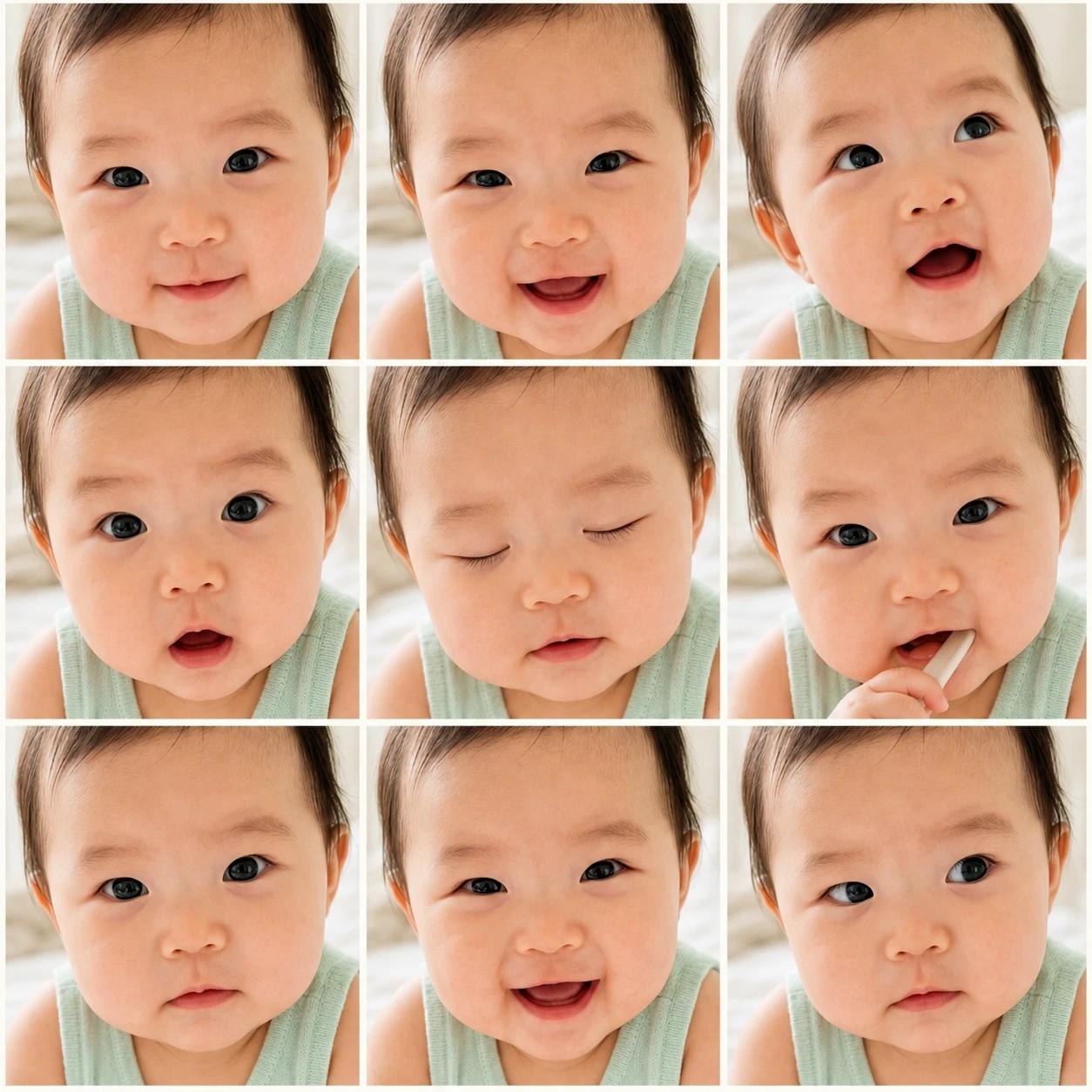
아기 표정 9컷 그리드
추천 AI
우리 아기 맞춤 만들기
프롬프트가 자동 입력됩니다. 본인 아기 사진을 첨부해서 전송하세요.
프롬프트
[Input] - language: Korean (optional caption only) - output_size: 1024x1024 (1:1 square) - reference: 1 chest-up baby photo (face fills frame, shoulder/neck visible) [Purpose] Convert the user's attached baby photo into a 3x3 face-close-up photo grid (9 cuts) — Instagram/poster-style baby moment collage. [Scene — image-to-image edit, 9 expressions of the SAME baby] Use the attached photo as the base baby. PRESERVE the baby's identity (face shape, skin tone, hair color/style, eye color, age) and the outfit color visible from the shoulder/neck in EVERY cut. Generate 9 close-up moment variations of THIS SAME baby in a 3x3 grid: - Cut 1 (top-left): direct front gaze, large eyes, soft smile - Cut 2 (top-center): front gaze, mouth slightly open, joyful - Cut 3 (top-right): looking up curiously, mouth open in wonder - Cut 4 (middle-left): direct front gaze, eyebrows slightly raised (surprised look) - Cut 5 (middle-center): EYES CLOSED, peaceful, sleeping-like expression - Cut 6 (middle-right): hand or small soft object (spoon, bib edge) near the mouth, curious - Cut 7 (bottom-left): direct front gaze, neutral or thoughtful - Cut 8 (bottom-center): direct front gaze, wide bright smile, eye contact - Cut 9 (bottom-right): side gaze, contemplative All 9 cuts must show the SAME baby — same age, same hair, same skin tone, same outfit (chest-up only, no body movement variation needed). Vary expression and gaze direction only. [Composition rule — EXTREME close-up] - Face fills ~85-90% of each cut - Only shoulder/neck and a small portion of the outfit visible (1-2 cm from frame edge) - DO NOT show waist, hands holding objects far from face, or any body parts beyond shoulder - Slight aspect variation per cut OK (e.g., slight tilt, slight zoom), but maintain extreme close-up [Grid Layout] - {grid_layout} - Background between cells: warm off-white #f8f4ed [Optional Caption] If "{optional_caption}" is non-empty, render this caption in small clean sans-serif (Pretendard SemiBold) at the {caption_position} of the grid (above or below all 9 cuts), in subtle warm gray #5a4a40. If "{optional_caption}" is empty, do NOT render any text — keep the grid pure photo only. [Photo Mood & Color Grading] - {mood_description} - {color_grading} [Photo Retouching — light, identity preserving] - Soft natural brightening - Natural skin texture preserved — NO heavy beautification, NO over-smoothing - Same mood and grading across all 9 cuts for visual unity [Style Rules] - Photographic real (not illustration, not anime, not 3D) - Slight shallow depth-of-field on each cut (subject sharp, background soft) [CRITICAL — Same baby across 9 cuts] - All 9 cuts MUST show the same baby from the attached reference photo - Face shape, eye color, hair, skin tone IDENTICAL across all cuts - Vary expression and gaze direction only — never change identity - Outfit color must match the visible portion of the reference photo (shoulder area) [🚫 PROHIBITED] - Different babies in different cuts - Body parts beyond shoulder visible - Heavy facial restructuring or beautification - Anime, 3D, illustration style - Real brand logos or celebrity references - Text/captions inside any individual cut (caption goes outside the grid only)
자주 묻는 질문
- Q. 사진은 어떤 구도가 가장 잘 나오나요?
- A. 얼굴이 화면 가득 보이고 어깨가 살짝 나온 정면 클로즈업 사진이 가장 잘 변환됩니다. 셀카처럼 얼굴만 너무 잘린 사진은 어깨 옷이 안 보여 9컷마다 옷이 다르게 그려질 수 있어요.
- Q. 9컷에 다른 아기 얼굴이 나와요.
- A. AI가 가끔 한두 컷에 다른 표정의 아기를 그리는 경우가 있어요. 결과를 받은 뒤 챗GPT에 '9컷 모두 첨부한 원본 사진의 같은 아기로 다시 그려주세요'라고 보내시면 보통 잘 보존됩니다.
- Q. 표정이 너무 비슷하게 나와요.
- A. 결과 받은 뒤 '각 컷의 표정을 더 다양하게 만들어주세요. 정면 웃음, 눈 감음, 손가락 입에 대기, 위 응시, 옆 응시 등으로요'라고 보내시면 표정 다양성이 살아납니다.
- Q. 텍스트 없이 사진만 9컷으로 나오게 할 수 있나요?
- A. 네, 캡션을 비워두시면 텍스트 없는 순수 사진 그리드가 나옵니다. 인스타 피드나 인테리어 액자용으로 잘 어울려요.
- Q. 인쇄해서 액자에 넣고 싶어요. 화질이 괜찮을까요?
- A. 엽서 크기 정도까지는 깔끔하게 인쇄됩니다. A4처럼 크게 인쇄하실 거라면 인쇄소에서 화질 보정 옵션을 요청하시면 더 매끄럽게 나옵니다.
문제가 해결되셨나요?