
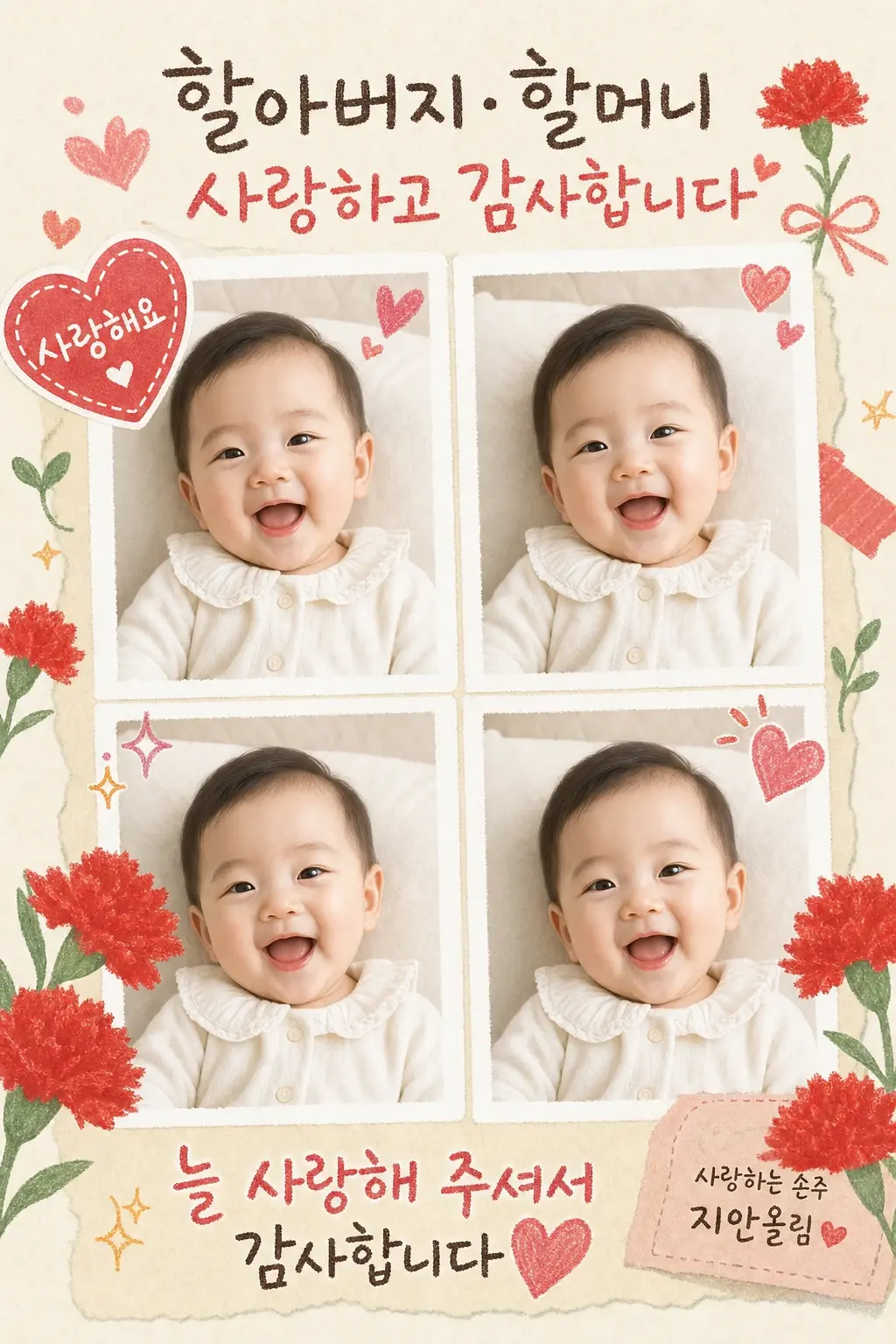
아기 4컷 효도 카드
추천 AI
우리 아기 맞춤 만들기
프롬프트가 자동 입력됩니다. 본인 아기 사진을 첨부해서 전송하세요.
프롬프트
[Input] - language: Korean - output_size: 1024x1536 (2:3 portrait) [Purpose] Convert the user's attached baby photo into a Korean 4-cut gratitude card. Generate 4 variations of the SAME baby in different angles and expressions, arranged as a 2x2 grid, with warm Korean message text around the photos. [Scene — image-to-image edit, preserve baby identity] Use the attached photo as the base baby. PRESERVE the baby's identity (face, body, age) across all 4 cuts. Generate 4 angle/expression variations of THIS SAME baby: - Cut 1 (top-left): the baby in the original pose/angle - Cut 2 (top-right): the baby with a different expression (e.g., a wider smile or curious look) - Cut 3 (bottom-left): the baby from a slightly different angle (e.g., looking left or tilting head) - Cut 4 (bottom-right): the baby with another expression (e.g., laughing or peaceful) All 4 cuts must be the same baby — same age, same hair, same skin tone, same outfit (with minor angle variations OK). Do NOT generate a different baby in any cut. [Card Layout] - Top 18%: a large warm Korean headline message — 2 lines of "{main_message}" in a soft handwritten Korean script (slightly tilted hearts, sparkles around). Tone: heartfelt and grateful. - Middle 55%: a 2×2 grid of 4 baby photo cuts (polaroid-style soft white frames, slight tilt for warmth). Each cut shows the same baby in a different angle/expression. - Decorations around the grid: {decorative_motifs} hand-drawn outlines (carnations, hearts, sparkles, flowers). - Bottom 18%: a smaller closing message "{closing_message}" in handwritten Korean, centered. Below that, on the right: "{sender_label} {baby_name} 올림" in small handwritten Korean (omit if {sender_label} is empty). - Background: warm cream paper texture with subtle hand-drawn doodles in {accent_color}. [Photo Retouching — light, identity preserving] - Soft brightening, natural skin smoothing - Slight warm color grading - Do NOT change facial features, body, age, or ethnicity of the baby - Same baby across all 4 cuts (this is the most important constraint) [Style Rules] - Typography: warm handwritten Korean script (Cafe24 Ohsquare, 나눔손글씨 펜 톤) for all messages — gives a sincere, handmade feel. - Color palette: cream/beige paper base + {accent_color} hand-drawn flowers and hearts + soft warm gray text. - Layout: feels like a child's handmade gratitude card with photos pasted on. [Visual Style] - The 4 baby photos are photographic (real); the surrounding card design is hand-drawn outline + watercolor wash style. - Warm cream paper background. [CRITICAL — Korean text accuracy] Render ALL Hangul correctly. The exact strings: - Headline (top): "{main_message}" (can span 2 lines) - Closing (bottom): "{closing_message}" - Optional sender line (bottom-right): "{sender_label} {baby_name} 올림" (only if both provided) [CRITICAL — Same baby across 4 cuts] - All 4 photo cuts MUST show the same baby from the attached reference photo. - Vary the angle and expression only — never change face, body proportions, age, hair, or skin tone. - The baby's face must NEVER be cropped out by the polaroid frame. [🚫 PROHIBITED] - Different babies in different cuts - Heavy facial restructuring or beautification - Broken or misrendered Hangul - Real brand logos or celebrity overlays - 3D, anime, manga style for the photos
자주 묻는 질문
- Q. 아기 사진을 꼭 첨부해야 하나요?
- A. 네. 첨부한 사진의 아기를 기준으로 4가지 앵글·표정으로 변환합니다. 사진 없이는 작동하지 않아요.
- Q. 메시지를 다른 용도로 바꿔 써도 되나요?
- A. 네, 자유롭게 바꾸세요. '할아버지·할머니 사랑해요', '엄마 아빠 감사합니다', '삼촌 결혼 축하해' 같은 메시지로 어버이날, 가족 행사, 명절 등 다양하게 활용 가능합니다.
- Q. 4컷에 다른 아기가 나오면 어떻게 하나요?
- A. AI가 가끔 4컷 중 한두 장에 다른 아기를 그리는 경우가 있어요. 결과를 받은 뒤 ChatGPT에 한 번 더 '4컷 모두 첨부한 원본 사진의 같은 아기로 다시 그려주세요'라고 보내시면 보통 잘 유지됩니다.
- Q. 표정이 너무 비슷하게 나와요.
- A. 결과 받은 뒤 '각 컷의 표정을 더 다양하게 만들어주세요. 예: 환하게 웃기, 호기심 가득한 눈, 평온한 표정, 활짝 웃기'라고 보내시면 더 다양해집니다.
- Q. 인쇄해서 액자에 넣거나 선물하고 싶어요. 화질이 괜찮을까요?
- A. 엽서 크기 정도까지는 깔끔하게 인쇄됩니다. A4처럼 크게 인쇄하실 거라면 인쇄소에서 화질 보정 옵션을 요청하시면 더 매끄럽게 나옵니다.
문제가 해결되셨나요?