
AI Picture Diary — ChatGPT Korean Elementary Crayon Diary Style Prompt
Best with
Prompt
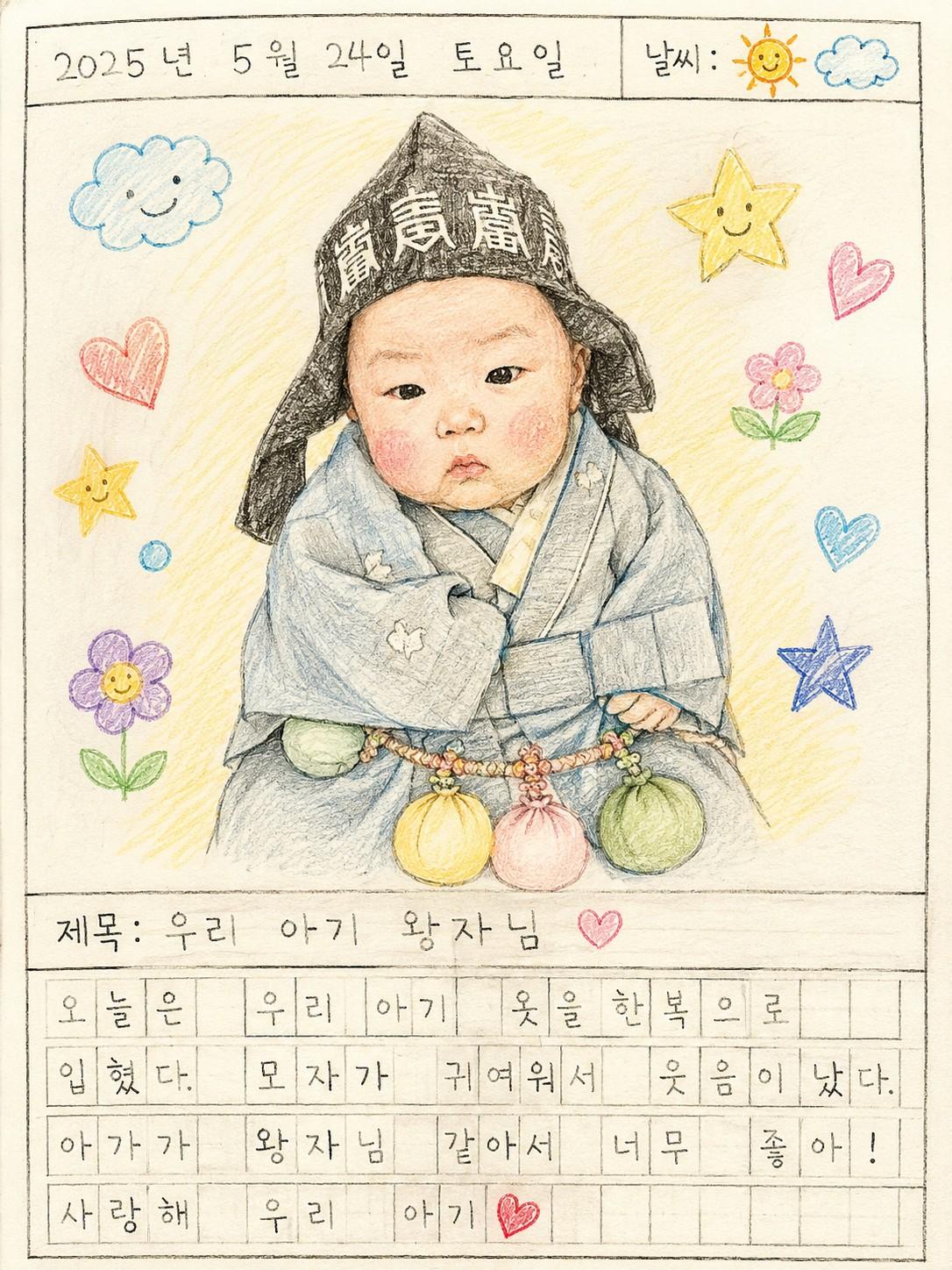
Based on the person in the uploaded photo, recreate as a Korean elementary-school style hand-drawn "picture diary" page. The overall layout should match an actual Korean child's picture-diary notebook: - Top: date / day / weather checkbox row - Center: a colored-pencil drawing made carefully, like a child drew it - Around the drawing: small doodles a child would add (stars, hearts, flowers, clouds, etc.) - Below the drawing: a short title - Bottom: a short diary entry written on a Korean manuscript-paper (원고지) grid Style: - Mixed colored-pencil and crayon texture - Warm hand-drawn coloring - Paper texture visible - Pure, cute children's emotional mood - Korean elementary picture-diary aesthetic - Warm pastel color palette - Natural, analog feel Person rules: - Keep the face and hairstyle from the uploaded photo - Maintain the same person feel - Avoid an overtly AI look - Convert naturally into a children's drawing style - Express the expression cutely and lively, matching the photo mood Auto-generated elements: - Generate date and weather randomly and naturally - Generate a short, cute title that matches the scene - Write the diary entry in a pure, short style as if a young child wrote it - Slightly imperfect spelling is OK and feels natural Output rules: - Vertical picture-diary page - Natural composition as if drawn on actual paper - Handwriting feel for all text - Text and drawing arranged harmoniously - Clean white paper background - High resolution - No watermarks, no logos
Who this is for
Great for parents who want to preserve everyday moments in a Korean elementary-school picture-diary style. This isn't just a photo-to-drawing conversion — the entire diary page is generated (date / day / weather checkboxes, the drawing, doodles, a title, and a short manuscript-paper diary entry). Perfect for digital parenting diaries, baby book pages, SNS aesthetic grids, or images to share with grandparents.
What you need
A front-facing or three-quarter portrait of your child (face clearly visible), a paid ChatGPT plan (GPT-4o or higher recommended), and a one-line description of the day (optional but helpful). With just a photo, ChatGPT will invent a diary entry; with a one-line hint like "first day at daycare" or "park trip with mom," the entry feels far more natural and personal.
How to use
- Open a new ChatGPT conversation and attach your child's photo.
- Copy the full prompt below. Optionally prepend a one-line hint like "Today was the first day of daycare."
- If the diary entry isn't quite right, just dictate it: "Change the diary entry to 'I went to the park with mom today. The slide was so much fun.'"
- If the drawing feels too AI-polished, add "Push the colored-pencil hand-drawn feel further and avoid smooth AI-style shading."
- Once happy, download and use it for digital diaries, baby book pages, SNS grids, or framed prints.
Tips for better results
- Keep the "as if a young child wrote it" line — it produces the most natural diary tone. If the entry feels too adult, add "Slightly imperfect spelling, short childlike sentences."
- If Korean handwriting comes out garbled, keep the diary entry to 2–3 short lines. Shorter entries render far more cleanly.
- For series consistency, fix date and weather explicitly: "Date is May 15, 2024, weather sunny." Useful when building a multi-page digital diary.
- If the person looks too illustrated to recognize, re-emphasize "Keep the same facial features and hairstyle as the photo." Front-facing, high-resolution natural-light source photos preserve identity best.
Variation ideas
- Series diary: same photo, multiple pages varying only the entry, date, and weather — bundle into one digital parenting diary.
- Seasonal series: "Change weather to spring → summer → autumn → winter" for a four-season set.
- Milestone-day pages: change the one-line hint to "100-day," "first birthday," "first daycare day," "visit with grandma" — instant memory-page for each.
- Family picture diary: "Expand the figure to include mom, dad, and child for a family picture-diary page."
Frequently asked questions
- Q. How is this different from the "crayon baby drawing" card?
- A. The crayon card converts a photo into a single colored-pencil drawing. This card generates the entire picture-diary page — date / day / weather checkboxes, the drawing with doodles around it, a title, and a short manuscript-paper diary entry. Use the crayon card for a standalone drawing; use this picture-diary card for preserving a memory as a full page.
- Q. I want to write the diary entry myself.
- A. Prepend something like "Diary entry should be: 'I went to the park with mom today. I rode the slide for the first time and it was so much fun.'" before the prompt — ChatGPT will hand-letter it onto the diary. If the child-voice tone feels off, add "Soften it into a short, slightly imperfect child's voice."
- Q. Korean handwriting comes out garbled.
- A. GPT image models render Korean less reliably than English. Limit the diary entry to 2–3 short lines and add "Render handwriting crisply and legibly." If it still fails, generate the page with the diary area empty and add your own handwriting later in Canva, PowerPoint, or an iPad notes app — that's actually a very natural workflow.
- Q. My child's face looks too illustrated to recognize.
- A. Some illustration drift is intentional for the picture-diary style, but you can push identity preservation. Re-emphasize "Keep the same person feel" and "Maintain the facial features and hairstyle from the original photo." A front-facing, high-resolution, natural-light source photo preserves identity best.
- Q. Will it hold up in print or as a book page?
- A. GPT images come out around 1086×1448 or 1024×1536, fine for A5 / A4 digital prints. For a multi-page baby book, generate each page at the same ratio so layouts align. For larger formats, run it through an upscaler (Topaz, Magnific) — the paper texture and colored-pencil tone survive upscaling well.
Did we solve your problem?